

Bill.com is one of the most established bill-pay platforms on the market, and it's the one we recommend most often to our ecommerce clients. This review covers why, along with a closer look in this review video.
Our history with Bill.com
LedgerGurus has been using Bill.com for years, helping clients across countless businesses pay thousands of bills through it. We're a certified Bill.com partner with a team trained and experienced in their solution, so this review comes from real, hands-on use, not a quick trial run.
What we like
Bill.com is a solution to automate business payments. This review covers why we like Bill.com for the following reasons:
- Check, ACH, and international payment automation
- Ease of use
- Separation of duties
- Integration with accounting software
- Accounts receivable support
One distinction worth making up front: Bill.com handles paying your vendors and suppliers, not employee expense reimbursement. If you're looking for that side of things instead, see our Expensify review.
Check, ACH, and international payment automation
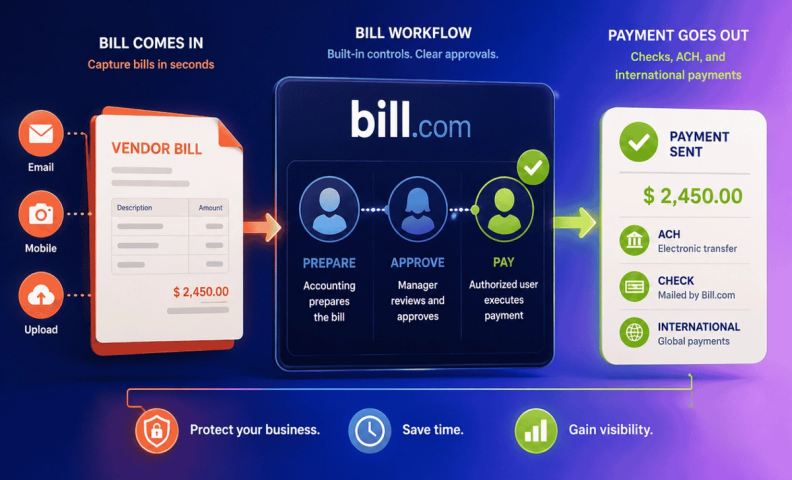
Writing checks is lame, and processing ACH payments isn't much better. One of our favorite things about Bill.com is that you can do everything from your computer or mobile device. They take documents, turn them into digital bills and process the rest. In the case of checks, this includes printing, mailing, and tracking the payment. Believe it or not, this takes a long time to do with paper.
In the case of ACH payments, many vendors don't want to go down this path because they don't want to share bank account information. Bill.com makes this easy and secure by having the vendor setup their bank account independently and allow their customer (the payer) connect for payments. Electronic payments become easy from there.
Bill.com also has the ability to do international payments. This provides yet another method and makes Bill.com a 1-stop shop.
Ease of use
Bill.com is easy to learn and use. It starts by getting bills into their system by one of 3 methods:
- Forwarding bills to a custom email address
- Taking a picture with their mobile app
- Uploading a file on their web app
Once the bill is in, Bill.com's Intelligent Virtual Assistant makes it easy to digitize the information from the document into their system and get it ready for approval and payment. Approvals and payments can be done on their mobile app or in the web app. This makes it easy for all involved.
Separation of duties
An oft overlooked process for most small businesses is good separation of duties. This means having different people owning different processes to protect the business assets. With payments, this means having someone prepare the payment (accounting professional), someone else approve it (employee who is responsible for that vendor), and someone else pay it (a signer on the bank account).
When a business is small, this is often the business owner, but as a business grows, the owner has more important things to do. Bill.com facilitates this process by having standard and custom roles that limit what can be done around a bill thereby streamlining the workflow and protecting the bank accounts. With LedgerGurus, we want the business owner or authorized alternate involved in the payment process, but nothing else. This way their money is protected, they stay aware of payment activity, but their time on this process is significantly minimized.
Integration with accounting software
Nobody wants to enter data twice, especially us accountants! Bill.com integrates with a variety of accounting software, but I will speak to QuickBooks Online as we are experts there. The integration is easy and data flows nicely from one system to another. As such, once working in Bill.com, you can rely on bills, payments, and invoices to sync across without effort. Bill.com will also sync customers, accounts, classes, and other elements that go into payable and receivables.
Accounts receivable support
As a bonus, Bill.com has an accounts receivable module. You can invoice from Bill.com and receive payments electronically via ACH or credit card. There are many other solutions that allow the same thing, but this module can leverage Bill.com's custom roles and permissions to let people only do those activities and have all payments in and out in one place.
Great company
We work with a lot of accounting solutions and we really appreciate Bill.com as a company. The support is great and quick to resolve issues. It starts with a great knowledge base and if you can't get your answer there, they have live chat support that almost always gets issues resolved during the chat.
Beyond that, Bill.com is a great business partner. We have a fantastic Account Executive who proactively reaches out to us with new developments and is always ready to help us with any questions we have. In our experience, this isn't an anomaly as we've met many other Bill.com employees and they are always helpful. This matters when you have an issue.
Use Bill.com
Now if this Bill.com review makes it sound like I'm a fanboy, it's because I am. They have earned that loyalty. In the areas I outlined, they do things well. When we meet a new company, we always discuss Bill.com and find it’s a good fit when:
- They are paying 3-5 bills manually (usually check)
- They need to split up the payments activity, but need to protect financial assets
For most companies, they have both needs. Bill.com for all!
Frequently asked questions
Is Bill.com a good fit for ecommerce businesses? Yes. LedgerGurus recommends it more often than any other bill-pay platform for our ecommerce clients. It's a good fit when a business is paying 3-5 bills manually each week or needs to separate payment duties to protect financial assets, and most companies need both.
How does Bill.com handle payments? Bill.com automates check, ACH, and international payments from your computer or mobile device. It turns uploaded documents into digital bills and handles the printing, mailing, and tracking on checks, and it lets vendors set up their own bank details independently for secure ACH payments.
Does Bill.com integrate with QuickBooks Online? Yes. Bill.com integrates with a variety of accounting software, and LedgerGurus works with it primarily alongside QuickBooks Online. Bills, payments, invoices, customers, accounts, and classes all sync automatically without manual double entry.
How does Bill.com support separation of duties? Bill.com uses standard and custom roles so one person can prepare a payment, another can approve it, and another (a bank account signer) can actually pay it, keeping business owners aware of payment activity without eating up their time.
Does Bill.com have an accounts receivable module? Yes. You can invoice directly from Bill.com and collect payments electronically via ACH or credit card, using the same custom roles and permissions as the payables side.
Get your Bill.com set up right
Bill.com is a great tool, but it only pays off when it's set up right: the correct roles, a real approval workflow, and a clean connection to QuickBooks Online. LedgerGurus can implement and manage Bill.com for your ecommerce business, so you get the automation and the payment controls without the setup guesswork.
