

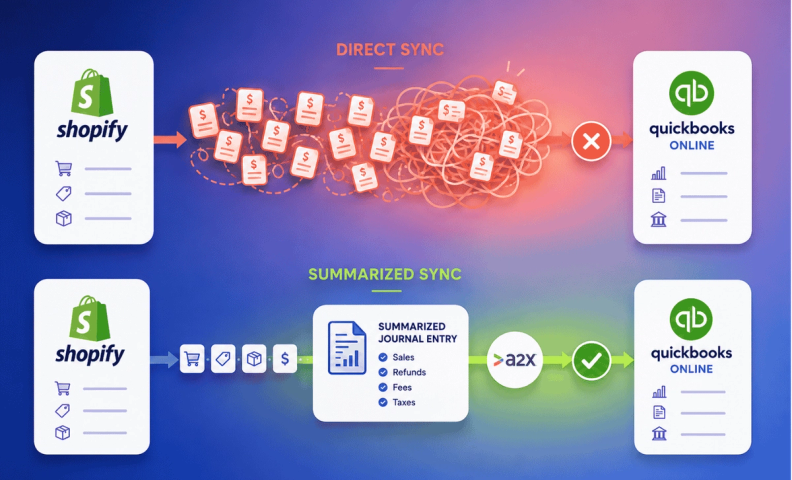
Plenty of small businesses run both QuickBooks and Shopify, so integrating the two seems like it should just make sense. Everyone loves a sync button. But it’s not always a good idea to push it!
Why use Shopify and QuickBooks Online separately
QuickBooks Online helps ecommerce companies manage sales and income, track bills and expenses, run payroll, and get real reporting insight.
Shopify, meanwhile, is where most ecommerce companies run their website, sell through channels like Facebook or Pinterest, and handle point-of-sale, plus track inventory. (We don't actually recommend using QBO for inventory but we do encourage you to get an inventory management system). For more on the basics, see 3 Accounting Basics for Shopify Sellers.
Two genuinely useful tools. Together, though, is where it gets complicated. We have plenty of opinions on when software should or shouldn't sync in general, here we're focused specifically on Shopify and QBO.
Why a direct sync seems like a good idea
Shopify actually recommends syncing with QuickBooks Online, and makes the case for it front and center, with no real downsides listed anywhere on their own site. It's an easy assumption: if the option exists, it must be a net positive. Push sales orders over, save time, track payment processors and deposits more easily, free up hours for other things.
Worth remembering, though: Shopify is a selling platform, not an accounting tool. They've built the sync, but they haven't closed the loop in a way that actually makes sense for your books, and that's exactly what the next section gets into.
3 reasons not to hit that sync button
Reason #1: The data doesn't match
Shopify pushes sales into QuickBooks as individual sales orders. But what actually hits your bank account is a settlement deposit, a lump sum combining multiple orders along with refunds, returns, and Shopify's own fees. Because of that mismatch, the activity in your bank account almost never lines up with what QuickBooks pulled in from Shopify (We cover the same core problem for Shopify sellers more broadly here).
The result is just noise: a register full of individual sales orders that don't correspond to anything you can actually reconcile against, more mess than the time your toddler once found a sharpie.
Reason #2: It slows you down
QuickBooks Online reloads a page every time you're on it, and the more data sitting in your file, the longer that takes. Sync in thousands of individual sales orders, and you've traded a faster business for a slower laptop.
Reason #3: Reconciliation becomes a nightmare
All those sales orders still have to be reconciled against your bank account eventually. Some won't come through cleanly. Numbers won't match. At month-end, you're stuck digging through the mismatch to figure out why, which is exactly the kind of time sink you started this whole thing to avoid.
If you're still set on syncing
If you're going ahead with a sync anyway, here's how to do it with less damage:
Assign processors to holding accounts. Route sales orders so deposits land in holding accounts tied to each payment processor. If Shopify can't assign a processor to a specific account, routing everything to one holding account is a reasonable fallback.
Bypass the bank account. Push sales orders into a Shopify holding account instead of your bank feed directly. It's still tedious and you'll be reconciling thousands of individual orders instead of one clean summary, but it keeps the mess out of your actual bank register.
What to do instead
Ask yourself the real question: do you need that level of detail sitting inside QuickBooks when it's already available, in full, inside Shopify? Usually, the answer is no, and syncing just recreates a report you could've pulled more cleanly at the source.
Our actual recommendation: leave the two systems separate. You still need complete financials in QuickBooks, just not by way of a direct sync. A2X is the better path, it summarizes your Shopify activity and brings it into QuickBooks cleanly, without the mess of individual sales orders. For the list of what commonly goes wrong when Shopify accounting isn't set up this way, see 5 Common Shopify Accounting Mistakes.
We can set up A2X for you, configure QuickBooks properly for ecommerce, and teach you how to use it.
Frequently asked questions
Why does Shopify recommend a direct QuickBooks Online sync if it causes problems?
Shopify built the feature and understandably promotes it, but they're a selling platform, not an accounting tool. The sync moves data; it just doesn't account for how that data actually needs to reconcile against your bank deposits.
What actually goes wrong when you sync Shopify directly with QBO?
Shopify pushes individual sales orders, but your bank account only sees lump-sum settlement deposits. That mismatch creates constant discrepancies, bloats your QuickBooks file, and turns monthly reconciliation into a hunt for why the numbers don't add up.
Is there ever a case where syncing Shopify with QBO makes sense?
If you're set on it, assigning each payment processor to its own holding account (or routing everything to one holding account) creates less damage than letting sales orders hit your bank feed directly, but it's still more work than the alternative.
What should I use instead of a direct Shopify-QBO sync?
A2X. It summarizes your Shopify activity into clean, accurate journal entries instead of pushing over every individual sales order, and ties out to your actual bank deposits.
Will switching away from a direct sync mean losing detail I need?
No. That level of detail already exists in Shopify. A summary integration like A2X gives QuickBooks what it actually needs, your overall financial picture, while Shopify stays the place you go for order-level detail.
Let us set up your Shopify-to-QuickBooks accounting the right way
Skip the sharpie mess entirely. We'll set up A2X, configure QuickBooks Online properly for your Shopify business, and make sure what lands in your books actually matches what's happening in your store.
