

We know that accounting for a typical business is quite boring. But Amazon seller accounting is generally more challenging, which makes it fun (at least for us gurus)!
If you are just starting your Amazon business, setting up a solid accounting foundation is more important than you probably think. Too many Amazon sellers let it fall through the cracks for too long, only trying to make sense of it at tax time. But if you are well on your way to making millions with your Amazon business, it's crucial that you have accurate accounting in place.
Poor accounting will give you inaccurate financial data that leads to poor decision-making. Not only will it affect your decision-making, but others will have a false sense of how your business is performing. This makes it incredibly difficult to get loans, investors, and sell your business.
Common challenges of selling on Amazon
Do you ever find yourself with any of these concerns?
- I'm struggling with timing issues with my Amazon transactions.
- I'm frustrated with complex Amazon reporting and reconciliations.
- Product returns are messing up my revenue and inventory management.
- I'm not sure what my cost of goods sold (COGS) is or how to find out.
- I don't know if I'm doing my sales tax properly.
- I'm overwhelmed by the high volume of transactions. It makes keeping accurate records difficult.
Yeah, we thought so. We hear these concerns every day from Amazon sellers who are looking for help. And yes, good accounting can resolve all of them.
5 benefits of successful Amazon seller accounting
So, while there are LOTS of benefits of doing things correctly, here are a few:
- Pay less tax
- Stay more profitable
- Experience less risk
- Have better visibility into your business's financial health
- Make better decisions
Pay less tax
Who doesn't want to save a few bucks when it comes to taxes? Spoiler alert: Proper accounting can help you do just that.
By understanding your expenses, deductions, and credits, and properly recording them, you can maximize your tax savings. That means more money in your pocket and less in the hands of the taxman. Cha-ching!
Stay more profitable
Imagine this: You're selling like crazy on Amazon, but your bank account isn't reflecting your success. What gives?
Well, that's where accurate accounting steps in. It helps you track your real profits by considering all those hidden costs and fees that can eat into your revenue. When you know where every penny goes, you can truly celebrate your hard-earned profits.
We go into some detail of these hidden costs and fees in Recording Amazon Sales in QuickBooks Online | Multiple Methods.
Experience less risk
Hey, we're all about adventures. That's part of why you started a business, right?
But financial ones? Not so much.
With proper accounting, you're navigating your business through clear waters. You'll be compliant with tax regulations and have a solid grip on your financial health. No more surprises when the taxman comes knocking or when unexpected expenses pop up. You'll have smooth sailing ahead, well at least when it comes to knowing what's going on!
Better visibility into your business's financial health
Remember that feeling of walking into a pitch-black room? Yeah, that's what running a business blindfolded feels like.
Good news: accounting is like flipping the light switch.
You get insights into your sales trends, cash flow, and overall business performance. Armed with this knowledge, you can steer your ship towards success with confidence.
Make better business decisions
Accounting isn't just about crunching numbers; it's about empowering your decisions. When you have accurate financial data at your fingertips, you can make informed choices about inventory, expansion, and investments. No more relying on gut feelings, now you're armed with data-driven superpowers!

Amazon accounting vs. Amazon bookkeeping
Alright, let's clear the air: accounting and bookkeeping are like dynamic duos, but they each have their own superpowers.
Bookkeeping is like the meticulous note-taker, recording every transaction and keeping your financial records organized.
Accounting, on the other hand, is the strategic thinker that takes those records and turns them into actionable insights. It's like peanut butter and jelly. They're great on their own, but together, they're unstoppable!
Specific considerations for Amazon seller accounting
Here are a few things you'll want to keep in mind as you tackle the nitty-gritty of Amazon accounting:
Accounting method: Cash vs. accrual
It's not just about when the money is in your pocket; it's about WHEN it's earned or spent.
Cash basis accounting tracks transactions when cash changes hands, while accrual basis accounting records them when the transaction occurs.
Choose the method that fits your business model and goals, and more importantly, where you are in your business.
Sales tax
Oh, sales tax! The bane of many ecommerce sellers' existence. Different states, different rules, and let's not even get started on the Wayfair ruling.
Keep your sanity intact by understanding your sales tax obligations and staying compliant. Nobody wants unexpected tax bills raining on their parade!
We've gone into GREAT detail about sales tax on this site, but this is a good place to start: Sales Tax for Amazon Sellers: What You Still Need to Do (Even Though Amazon Collects It) .
3 main keys of Amazon seller accounting
Ready for some real talk? Amazon seller accounting isn't all rainbows and unicorns. There are a few challenges you will encounter along the way.
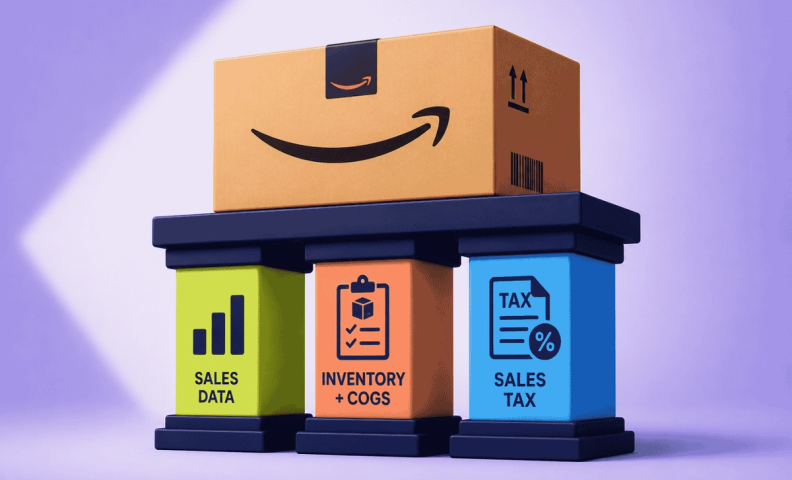
We have found three key areas in which Amazon sellers often have trouble with their accounting. You will be well on your way to success if you can address these three key areas:
- Accurate sales data
- Accurate recording of inventory and COGS
- Sales tax compliance
Accurate sales data
Problem:
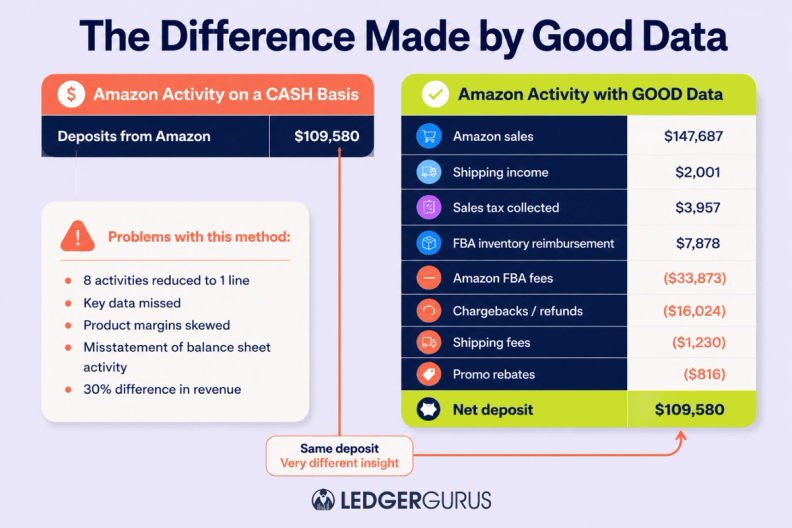
Amazon hits your bank account with a deposit every two weeks. Small business owners and even hired bookkeepers will often record those deposits as sales. Unfortunately, this is a big error that leads to poor sales data (although this works for a small, young Amazon business).
Your deposit includes not only your sales, but also all other activity that happens on your Amazon seller account, such as FBA fees, shipping fees, warehouse fees, sales tax, returns, and charge backs.
Yeah, thanks for making this so difficult, Amazon!
If you are using Amazon for shipping and warehousing, there can be 30+ activities going on. In addition, the deposit that hits your bank account does not account for when all the separate activity took place. You will only see the net deposit on the date that you receive that deposit.
Solution:
Solving this issue can be complex if you decide to do it manually. It requires going into the back end of your Amazon seller account, pulling all the data into a spreadsheet, sifting through the data, and accurately accounting for the data in your accounting software.
Or you can automate it.
Rethink the sync!
This is a good place to talk about NOT syncing your Amazon store with QuickBooks. It may sound counterintuitive. Why not sync if it'll bring all your sales channel data into your accounting software?
Yes, but you see, it brings it ALL in. Every little detail of every single transaction.
All of it has to be categorized and reconciled. This may not be that bad for 40-50 transactions, but 400-500 will be overwhelming, and 40,00-50,000 will feel like hell on earth. Especially since all of it is just duplicating what's already in Amazon and doesn't have to be in your accounting software.
No, trust us. There is a better way.
A2X is an amazing tool that connects your Amazon seller account with your accounting software, sitting neatly in between them. It takes all the correct data from the back end of Amazon and automatically updates QuickBooks with ONE tidy journal entry.
You get all the accounting information you need in your accounting software, and all the other stuff is still in the back end of Amazon where you can access it, if you need to.
You won't have to worry about a thing. Yes, you should currently be clapping your hands for A2X's technology and getting teary eyed…it's normal. Read more about Why A2X is an Essential Accounting Tool for Amazon Sellers.
If you are starting with A2X, you can visit our blogs on connecting A2X to Amazon and A2X to QuickBooks. You can also view our in-depth video on setting up and using A2X. Or if you'd rather, we're happy to set it up for you. We'll set it up and teach you how to use it. Cool, huh!
Accurate recording of inventory and COGS
Problem:
Got inventory? Awesome! Got accurate inventory records? Even better! Unfortunately, most people don't.
Inventory and COGS errors are the most common problems we see in accounting for amazon sellers. Inventory mismanagement can throw your numbers out of whack faster than you can say “Prime shipping.”
Errors usually occur when businesses purchase new inventory. When inventory is purchased, bookkeepers or small business owners will often immediately enter the cost of purchasing that inventory as COGS.
For example, let's say your business purchases $80K worth of inventory in January. The following is what we commonly see, which is inaccurate:
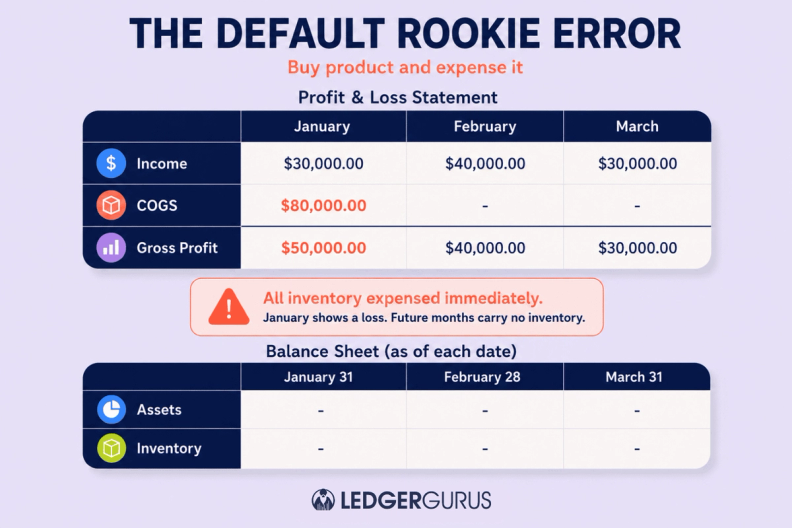
Recording COGS like this shows a $50K loss in January, a $40K gain in February, and a $30K gain in March.
It may be reflective of the way cash is moving through your business, but it does not accurately reflect the performance and profitability of your business. In addition, this method will show your inventory balance as zero.
The inaccurate recording of COGS and inventory is more detrimental as your business grows. You will get lost on how your business is truly performing, and the value of your assets will be inaccurate. As already mentioned, these problems become serious when trying to get investors, loans, or when selling your business.
Solution:
So, how do you accurately record COGS and inventory?
For COGS, there is an accounting rule called the matching principle. The matching principle states that expenses should be matched in the same time period for the associated revenues.
Basically, COGS should not be recorded until you SELL an item.
As an Amazon seller, here are the basic steps to recording COGS each month:
- Look up quantity sold for each SKU
- Multiple the quantity by SKU cost
- Record this amount as COGS
It can get a little complicated when diving into these steps. If you find this to be true, read for more details on accurately recording COGS and why COGS matters.
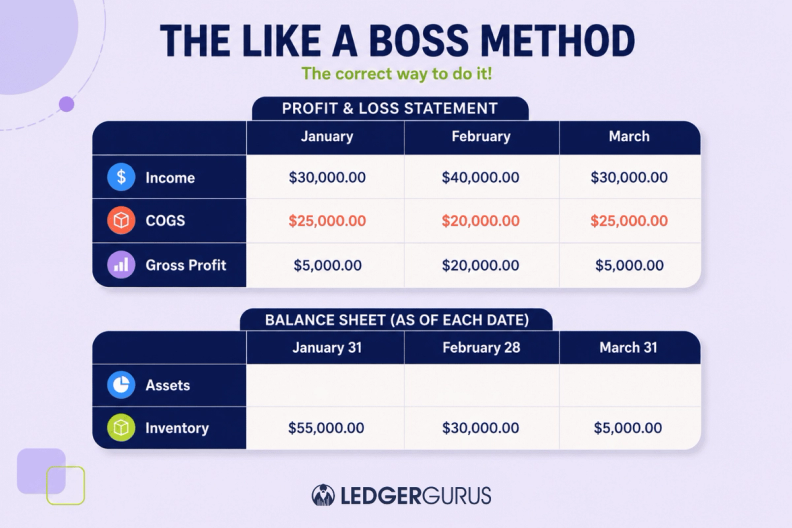
You should also have an ending inventory balance for each month. When you purchase inventory, the amount of inventory you purchased should be added to your inventory balance. Then, each month you subtract your COGS from your inventory to get a new inventory balance.
Using the previous example, this is what your books should look like if you sold $25K worth of inventor in January, $20K in February, $25K in March, and didn't purchase anymore inventory during this period:
Manually recording COGS and inventory can be complicated and time-consuming. Once again, we recommend using A2X. It will automatically update your COGS and inventory information.
You just need to make sure that you have entered the cost of each SKU on your Amazon seller account. If you haven't entered the cost of each SKU in the past, this can be a daunting task. At least start by making sure you do this moving forward.
Sales tax compliance
Problem:
One of the more complicated and ignored aspects of accounting for Amazon sellers is sales tax. eCommerce sales tax is a beast, it's brutal. In some cases, ecommerce businesses ignore sales tax for too long. Others that address it have a hard time getting it right (we don't blame you!).
Since the South Dakota v Wayfair Supreme Court ruling in June 2018, states have been making their own laws for when your business is legally required to collect and pay sales tax. Frankly, it's a pain in the butt for Amazon sellers to track state sales tax laws and stay compliant.
If you don't get on the correct path to sales tax compliance, you may find yourself scrambling to pay huge balances and penalties for sales tax liabilities. We have seen it absolutely destroy businesses, so don't let this seemingly menial task slip through the cracks.
Solution:
The good thing about sales tax is that because of marketplace facilitator laws, marketplaces are required to collect and remit sales tax on behalf of their sellers in all states that have sales tax laws (except states that have no state sales tax, but individual cities do, like Alaska. Also, Colorado has home-ruled cities that are also not covered.)
That means that if you ONLY sell on Amazon, you don't really have to worry about sales tax. However, if you also sell on other channels, like Shopify or BigCommerce, etc., you are still responsible for the sales tax on your other channels, and your sales on Amazon count toward your nexus thresholds. For more information on this, read The Ecommerce Sales Tax Guide: What You Need to Know to Stay Compliant (and Sane).
If you notice that your sales tax liabilities are significant in multiple states, you will probably want the help of a sales tax professional and/or make use of sales tax automation software.
Also, we suggest you download our free Sales Tax Compliance Checklist.
5 tips for how to do bookkeeping for Amazon sellers
Alright, brave entrepreneurs, it's time to tackle bookkeeping head-on. Here's your playbook:
Get accounting software, not a spreadsheet!
Step away from the spreadsheet, seriously. Modern accounting software is your new best friend. It's like having a personal assistant that keeps your financial records in tip-top shape.
We prefer and recommend QuickBooks Online to our clients, but there are others to choose from. Pick one that is the best fit for your business.
Another thing we recommend is to get software that is cloud-based. Your business is cloud-based, so doesn't it make sense that your accounting software is, too. Besides, cloud-based software integrates with other apps and tools MUCH better than desktop-based software.
Automate, don't sync!
Automation is the name of the game. We've gone into some detail on this topic earlier in this blog, but it's worth a re-mention.
Let tools like A2X do the heavy lifting, syncing your Amazon data effortlessly and ensuring accuracy. No more manual data entry headaches!
And if you'd rather not set it up yourself, we can do it for you.
Get a well-ordered chart of accounts
Think of this as your financial map. A well-organized chart of accounts helps you categorize expenses, income, and assets, making your financial journey smooth and hassle-free.
For information on how to set up your chart of accounts, watch Setting Up Chart of Accounts in QuickBooks Online | For Online Sellers.
We also have a free template of what a well-ordered chart of accounts looks like for an ecommerce business.
We can also set this up for you.
Stay on top of your Amazon bookkeeping
Ecommerce accounting is a necessary part of your business. Stay on top of your transactions. Regularly reconcile your accounts, review your financial statements, and ensure everything is in shipshape.
This can seem like a pretty simple thing, but it can get complicated, especially as your ecommerce business gets bigger.
In partnership with A2X, we created a tool to help called the Ecommerce Bookkeeping Checklist. It lists all the bookkeeping tasks you need to do on a weekly, monthly, quarterly, and annual basis to stay on top of things.
Outsource when you're ready
Hey, superheroes need sidekicks too! When your business grows, consider outsourcing your accounting to LedgerGurus. Our team of ecommerce-accounting experts can handle the complexity while you focus on what you do best. Building your business.
Frequently asked questions
Why doesn't my Amazon deposit match what I actually sold?
Amazon combines sales, FBA fees, shipping, storage, returns, chargebacks, and sales tax into one net deposit every two weeks. If you're using Amazon fulfillment, there can be 30+ different activities bundled into that single number.
Should I sync my Amazon store directly with QuickBooks?
Generally, no. Syncing brings in every individual transaction, which is manageable at 40-50 transactions but overwhelming at thousands. A tool like A2X summarizes everything into one clean, accurate journal entry instead.
When should I record COGS for my Amazon inventory?
Only when the item actually sells, not when you purchase the inventory. Recording the full purchase cost as COGS immediately creates wildly inaccurate monthly profit swings and zeroes out your inventory balance.
Do I need to worry about sales tax if I only sell on Amazon?
Not much. Amazon, as a marketplace facilitator, is required to collect and remit sales tax on your behalf in states with sales tax laws. If you sell on other channels too, you're still responsible for those sales, and your Amazon sales still count toward your nexus thresholds elsewhere.
What's the difference between bookkeeping and accounting?
Bookkeeping records every transaction and keeps your financial data organized. Accounting takes those records and turns them into insights you can actually act on, they work together, but they're not the same thing.
When should I outsource my Amazon accounting instead of doing it myself?
Once the complexity, transaction volume, multiple sales channels, inventory, sales tax across states, starts eating significant time or you're unsure the numbers are right, that's usually the signal it's worth bringing in a professional.
Build an Amazon accounting foundation that actually holds up
Lumpy deposits, sales tax across a dozen states, inventory numbers that never quite line up, these are exactly the problems LedgerGurus solves for Amazon sellers every day. We'll get your books set up right the first time, so you always know your real margins, stay compliant everywhere you have nexus, and never scramble come tax season.
